Full Stack Development
Top 5 Platforms Offering Free Cloud Servers for Development & Learning
Discover the best platforms offering free cloud servers for developers and learners. Explore free-tier services from IBM, Oracle, Google Cloud, AWS, Azure, and Alibaba Cloud.
 Shashikant Dwivedi
Hey there, if you are a developer and at some point you have a great idea that you want to develop and showcase to other people, but lack a place where you can host your application.
In this article, I will share some resources/providers where you can get free servers with RAM ranging from 1 GB to 24 GB to showcase your creations to the world.
So without any more bullshit, lets begin.
How to use this list
Each platform’s free tier changes often. Check current limits (CPU hours, always-on rules, and card verification) on the official site before you depend on a workflow.
AWS (Amazon Web Service)
The great old sage of cloud computing, AWS, offers a free 1 GB server for a year. It's not much, but it's sufficient to run your applications. I have used this personally to host my projects during the development period.
Here are the specifications of the server -
| Compute | Value |
|---|---|
| vCPUs | 1 |
| Memory (GiB) | 1.0 |
| Memory per vCPU (GiB) | 1.0 |
| Physical Processor | Intel Xeon Family |
| Clock Speed (GHz) | 3.3 |
| CPU Architecture | i386 |
| GPU | 0 |
| GPU Architecture | none |
| Video Memory (GiB) | 0 |
| GPU Compute Capability | 0 |
| FPGA | 0 |
For more specification-related details check the reference site -

Also, here's the link to AWS Free Tier -

Azure
To be honest, I have not used Azure much; I have used it only a small number of times. But you can get the same capacity of server from Azure as well, which is 1 GB of RAM for 1 Year.
Here's the specification of the server -
| Compute | Value |
|---|---|
| vCPUs | 1 |
| Memory (GiB) | 1.0 |
| Memory per vCPU (GiB) | 1.0 |
| CPU Architecture | x64 |
| GPU | 0 |
| Capacity Support | True |
| VM Generations Supported | V1,V2 |
| Low Priority | False |
| vCPUs per Physical Core | 1 |
| VM Deployment Method | IaaS |
For more specification-related details check the reference site -

Also, here's the link to Azure Free Tier -

GCP (Google Cloud Platform)
Again, I have not used much GCP; I am an AWS boy. However, it also offers the same capacity as the other two mentioned before 1 GB of RAM for 1 Year. As of writing this article, it offers that free server for LifeTime. So, this might be what you wanted for your small project.
Here's the specification of the server -
| Property | Value |
|---|---|
| Instance Type | e2-micro |
| Details | Cost optimized with burstable capabilities. Low-traffic web servers, Small databases, Development and test environments. |
e – Economic general purpose with burstable capabilities
2 – Generation
micro – 0.5x RAM/CPU ratio |
| Instance Family | Cost optimized |
| Description | Efficient Instance, 2 vCPU (1/8 shared physical core) and 1 GB RAM |
| vCPUs | 2 |
| Memory | 1 GiB |
| CPU Architecture | x86_64 |
| Processor | Intel Skylake, Broadwell, and Haswell, AMD EPYC Rome and EPYC Milan |
| Shared CPU | yes |
| GPU | no |
| Sustained Discounts (SUDs) | no |
For more specification-related details check the reference site -
Also here's the link to GCP Free Tier -

Alibaba Cloud
I have hardly used it once, about 2-3 years ago. You can give it a try. It also offers a 1GB RAM server for about 12 months.
Here's the specification of the server -
| Property | Value |
|---|---|
| vCPUs | 2 |
| Memory | 1 GiB |
| CPU Architecture | x86_64 |
| Processor | Intel Skylake, Broadwell, and Haswell, AMD EPYC Rome and EPYC Milan |
| Shared CPU | yes |
| GPU | no |
| Sustained Discounts (SUDs) | no |
For more specification-related details check the reference site -

Also here's the link to Alibaba Free Tier -

⚠️
As Alibaba is a China-based company, security concerns may arise due to local laws. Consider this if you plan to use it for sensitive matters.
Oracle Cloud
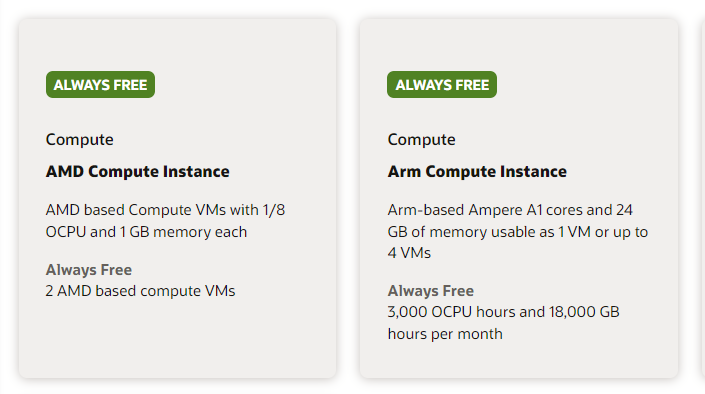
Oracle provides an exceptional free tier that I highly recommend. I've been using it since I discovered it. They offer two AMD-based servers with 1GB of RAM each, or Arm-based servers with up to 24GB. You can choose to use them as one or up to four separate servers—it's a fantastic deal.
You can see more details about it here -
https://www.oracle.com/in/cloud/free/
Also If you don't believe me just see it yourself -
As promised, I've shared the Top 5 Free Server Providers. If you have any side or small projects to showcase, go ahead and share the link in the comment section.
Written by Shashikant Dwivedi
Engineer, occasional writer, full-time noticer. Based in Prayagraj, India. New essays land roughly twice a month.
Keep reading
Adjacent essays.
DevOps
Setting Up Nginx as a Reverse Proxy - The Easy Way! 🚀
Oct 25, 2024 · 2 min
DevOps
Configuring Apache on an AWS Ubuntu Instance: Installation Guide
Sep 14, 2024 · 2 min

DevOps
🚀 PostgreSQL Installation Guide for Ubuntu: Your Complete Walkthrough!
Jan 1, 2025 · 2 min
The newsletter
New articles in your inbox.
Occasional articles on engineering, tooling, and software development practices. No marketing, no fluff — just the article, when it's ready.
Unsubscribe with one click. Your email never leaves the list.